
Free AI Content Detector
Use our AI content detector to check whether your text looks AI-generated and get simple fixes to make it sound human.
AI Content DetectorKey Takeaways
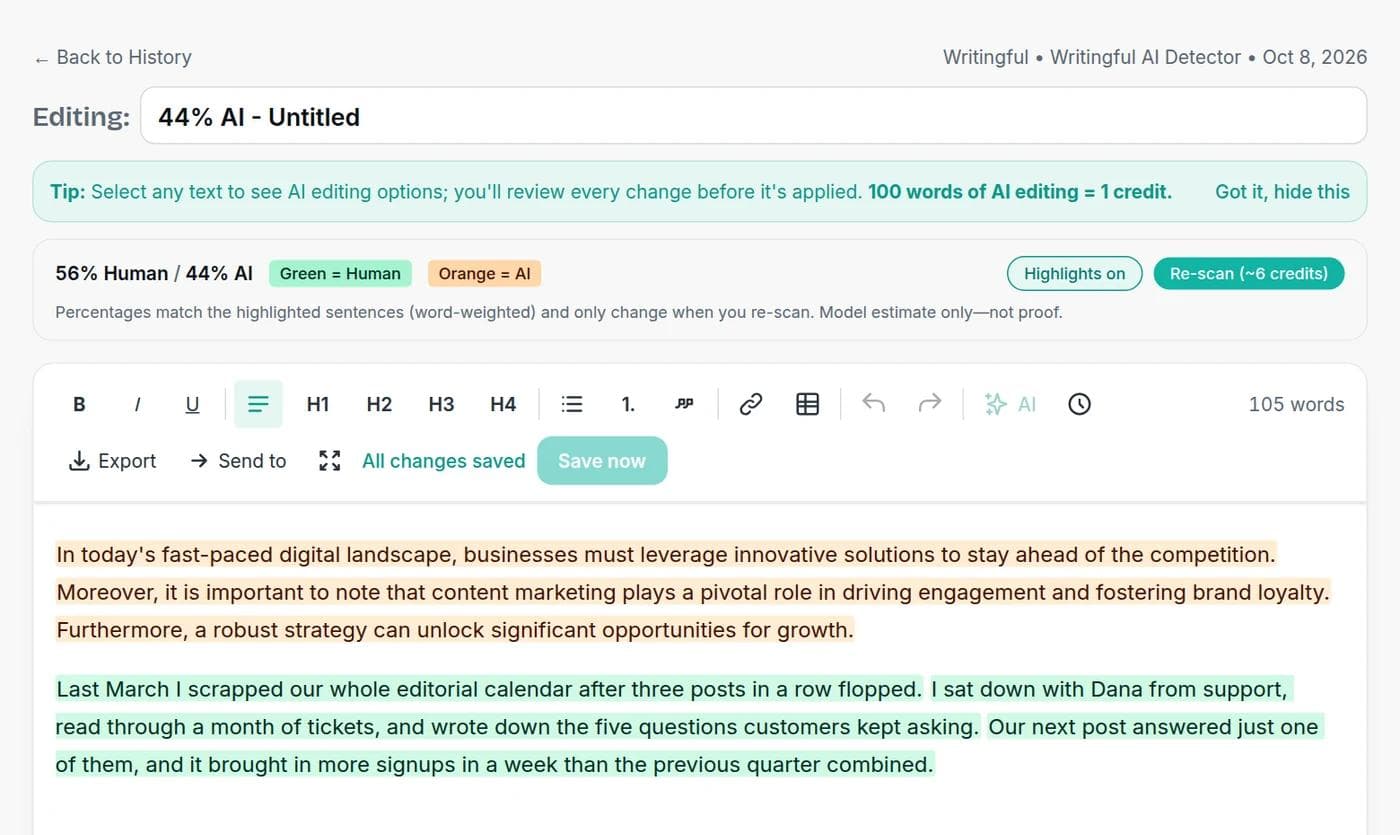
Paste text or pick an article from your history and get a Human vs AI split, with every passage marked green (human) or orange (AI).
It is an estimate, not proof. Every AI detector, ours included, can be wrong in both directions.
The detector is included on paid plans. On the Free plan you can try an interactive demo with sample data.
A scan costs 5 credits per 100 words, with a minimum of 5. A 1,000-word article costs 50 credits.
What the AI Content Detector does
The AI Content Detector reads your text and estimates how much of it looks AI-generated. You get an overall Human vs AI split and a sentence-level view: passages that read as human-written are marked green and passages that read as AI-written are marked orange. That makes it useful for finding the stiff, generic stretches of a draft that are worth rewriting.
It does not tell you who wrote the text or which AI model produced it. It gives you a probability for each passage, and probabilities can be wrong.
How to check your text
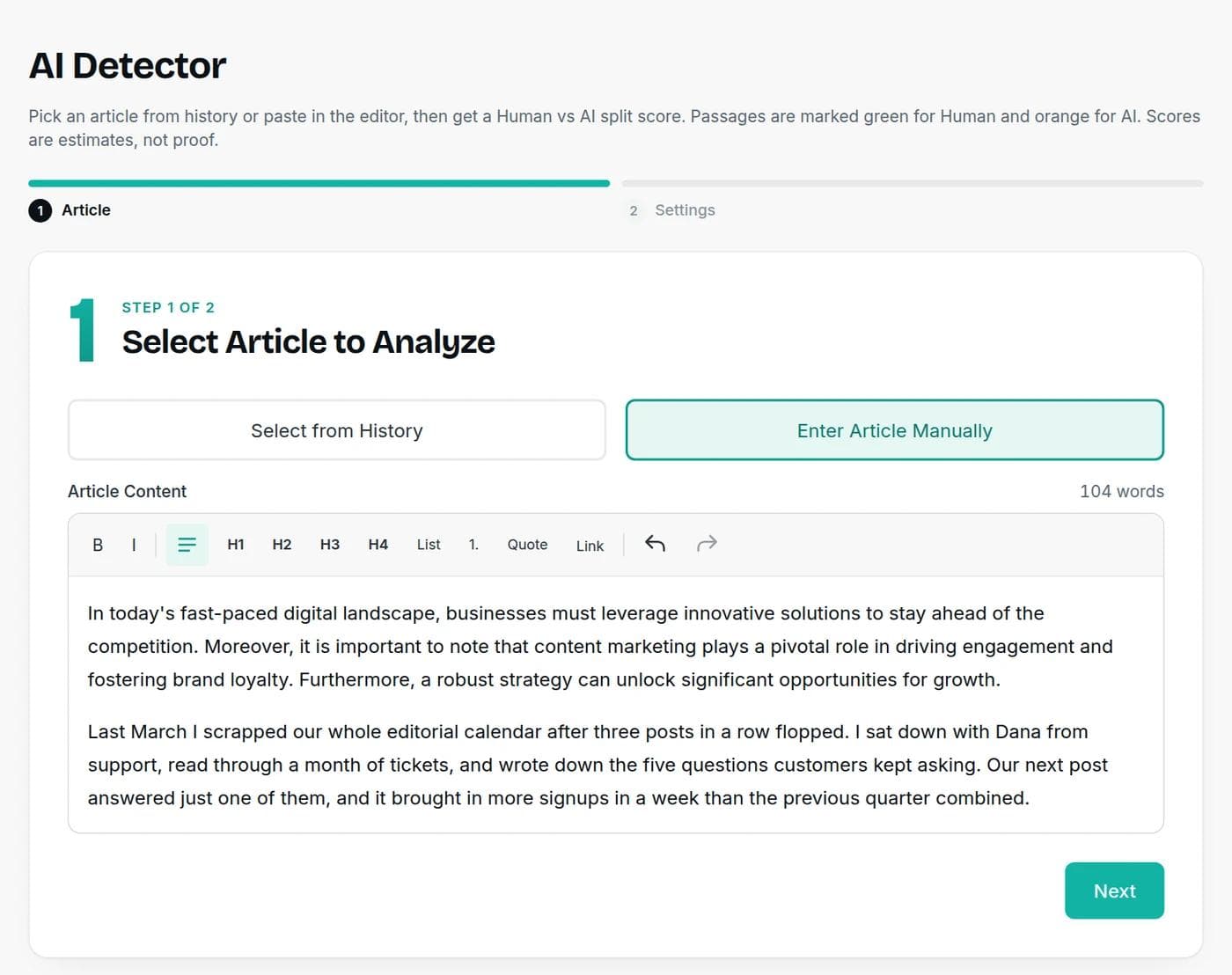
Step 1: Pick or paste your article
Choose an article from your history, or paste or type text into the editor. Scans can handle long documents, up to 200,000 characters at a time.
Step 2: Run the detection
The settings step shows the estimated cost before anything is charged. Click Run AI detection and the results appear in a few seconds. Your text opens in the editor with the passages highlighted. You can switch the highlights on or off, edit the text, and re-scan for the same cost. The scan is saved to your history with the article.
What a scan costs
The detector charges 5 credits per 100 words of input, with a minimum of 5 credits:
| Text length | Credits |
|---|---|
| Up to 100 words | 5 |
| 500 words | 25 |
| 1,000 words | 50 |
| 2,000 words | 100 |
The detector is available on every paid plan, starting at $7.50 a month billed yearly. Free accounts can open the detector and try an interactive demo with sample data, which uses no credits. See the pricing page for what each plan includes.
How to read the results
- The split is a snapshot. It says how much of the text the detector judged human or AI at the moment of the scan. Editing the article afterwards does not change it, so run a new scan to see the effect of your edits.
- Orange passages are where to look, not what to condemn. Generic openings, stacked transition words and uniform sentence length tend to score as AI.
- Short text is unreliable. A few sentences give a detector very little to work with. Scan a full section or the whole piece.
- Formal and technical writing scores higher. Clear, consistent, textbook prose can look machine-like even when a person wrote it.
How AI detectors work, in plain terms
Most detectors look at how predictable a text is to a language model, and how much its sentence length and structure vary. Machine-written text tends to be smooth and predictable, while people write with more uneven rhythm and surprising word choices. The detector turns those patterns into a probability.
That is also why detectors fail. Anything that makes writing more predictable looks more like AI, including plain style, a limited vocabulary and a heavily edited draft. Anything that adds variety, including AI text that someone has rewritten, can look more human.
How accurate are AI detectors?
Less than most people assume. In 2023 OpenAI shut down its own AI text classifier because of its low rate of accuracy. By OpenAI's own figures, it correctly flagged only 26% of AI-written text as likely AI-written, and wrongly flagged 9% of human-written text as AI. Read the original announcement and update.
What OpenAI's own AI text classifier got right and wrong
OpenAI's classifier caught only 26% of AI-written text and wrongly flagged 9% of human-written text, which is why OpenAI withdrew it in 2023.
View the numbers
| Item | Value (%) |
|---|---|
| AI text correctly flagged | 26 |
| Human text wrongly flagged | 9 |
Bias is another problem. A 2023 study in the journal Patterns found that several widely used detectors misclassified over half of essays written by non-native English speakers as AI-generated, while being nearly perfect on essays by native speakers. The authors warned against using detectors in classrooms without care. Read the study.
Treat any score, from any detector, as a reason to look closer. It is not evidence of who wrote something.
What to do with a high AI score
If you used AI to draft the text
Rewrite the orange passages with something only you could write: a specific example, a number from your own work, a clear opinion. Cut filler transitions and vary your sentence length. If the phrasing is simply stiff, open the draft in the editor and use Send to to run it through the text humanizer. Then scan again to see the difference.
If you wrote it yourself
A high score on text you wrote is a false positive, and it happens, especially with formal writing, non-native English and short samples. Don't rewrite your own work just to please a detector. Keep your notes, outlines and earlier drafts, and be ready to show how the piece came together if someone asks.
Who uses an AI detector, and how
- Bloggers and content teams check drafts before publishing to find generic passages that need a human touch.
- Editors and agencies check outsourced or repurposed copy as a quality signal, not as a verdict on the writer.
- SEOs review large batches of drafts for thin, template-like sections.
- Teachers and managers should be careful. Given the error rates above, a score should start a conversation and never decide an outcome on its own.
Rules about AI-written content
Schools, publishers and clients set their own policies, so check the ones that apply to you and disclose AI use where it is required. For search, Google does not penalize content just for being written with AI. Its guidance warns against producing many pages that add no value for readers and says AI output should be fact-checked before publishing. Read Google's guidance on AI-generated content.
If you are drafting with AI, the AI article writer and AI blog writer produce a first draft you can edit and then scan here.
Frequently asked questions
Writingful for your kind of writing
See how Writingful helps with the content you write most, by use case and by industry.

Story Writing
Brainstorm plots, draft scenes, and write short stories faster, then make them your own.
- Short story drafts
- Scene and dialogue
- Character profiles and backstories

SEO Content Writing
Research keywords, write articles, and optimize them for search in one place, without publishing thin content.
- Keyword research
- Article drafts
- Content outlines and briefs

Press Release Writing
Draft clear, factual press releases in minutes, from the facts and quotes you approve.
- Product and service launches
- Company news
- Event announcements

Manufacturing
Write product pages, capability statements, case studies, and technical articles faster, with specifications you have checked.
- Product and catalog descriptions
- Capability statements
- Case studies

Real Estate Agents
Write listing descriptions, neighborhood guides, market updates, and blog posts in less time, with fair housing in mind.
- Listing descriptions
- Neighborhood and area guides
- Market updates and newsletters

Accountants
Write client emails, tax-season updates, and firm blog posts faster, while keeping client data and professional rules in view.
- Firm blog posts and tax explainers
- Service pages
- Client deadline emails