
Free AI Blog Writer
Use our free AI blog writer to create amazing blog posts in minutes.
Free AI Blog WriterKey Takeaways
Start free: type a blog topic, pick a length from 500 to 1,000 words, and get a full draft in minutes.
Want research first? The Advanced Writer (paid plans) walks you through references, keywords, title and outline before it writes.
Edit in the built-in editor, then send the post to the SEO Optimizer, Interlinker, Humanizer or AI Detector.
Free plan: 5,000 words a month, no credit card. You sign in with Google to use it.
What an AI blog writer does, and what makes a blog post different
A blog post has a job an essay does not: it targets a search, links to your other pages and nudges the reader toward something. An AI blog writer helps with the part that eats the most time, getting from a topic to a structured first draft with an introduction, headed sections and a conclusion. It cannot supply your experience, your numbers or your point of view. That part is still yours, and it is what makes a post worth ranking.
Two ways to write a blog post with Writingful
| Simple Writer | Advanced Writer | |
|---|---|---|
| Best for | A quick draft from a title | A post built around a keyword and a researched outline |
| Starts from | Your topic and a few settings | Your topic, then Google results for it |
| Plans | Every plan, including Free | Paid plans |
| Length | 500 to 3,000 words (Free: up to 1,000) | 300 to 5,000 words |
| You decide | Content type, keywords, language, point of view, instructions, models | Reference pages, primary and secondary keywords, title and outline, then models and voice |
Write a blog post in the Simple Writer
Enter your topic in the box above and pick a length. You'll sign in with Google (free, no card) and land in the Simple Writer with your topic filled in. Choose a content type, add the keywords you want to rank for and anything the draft must include, then pick one or more AI models and generate.
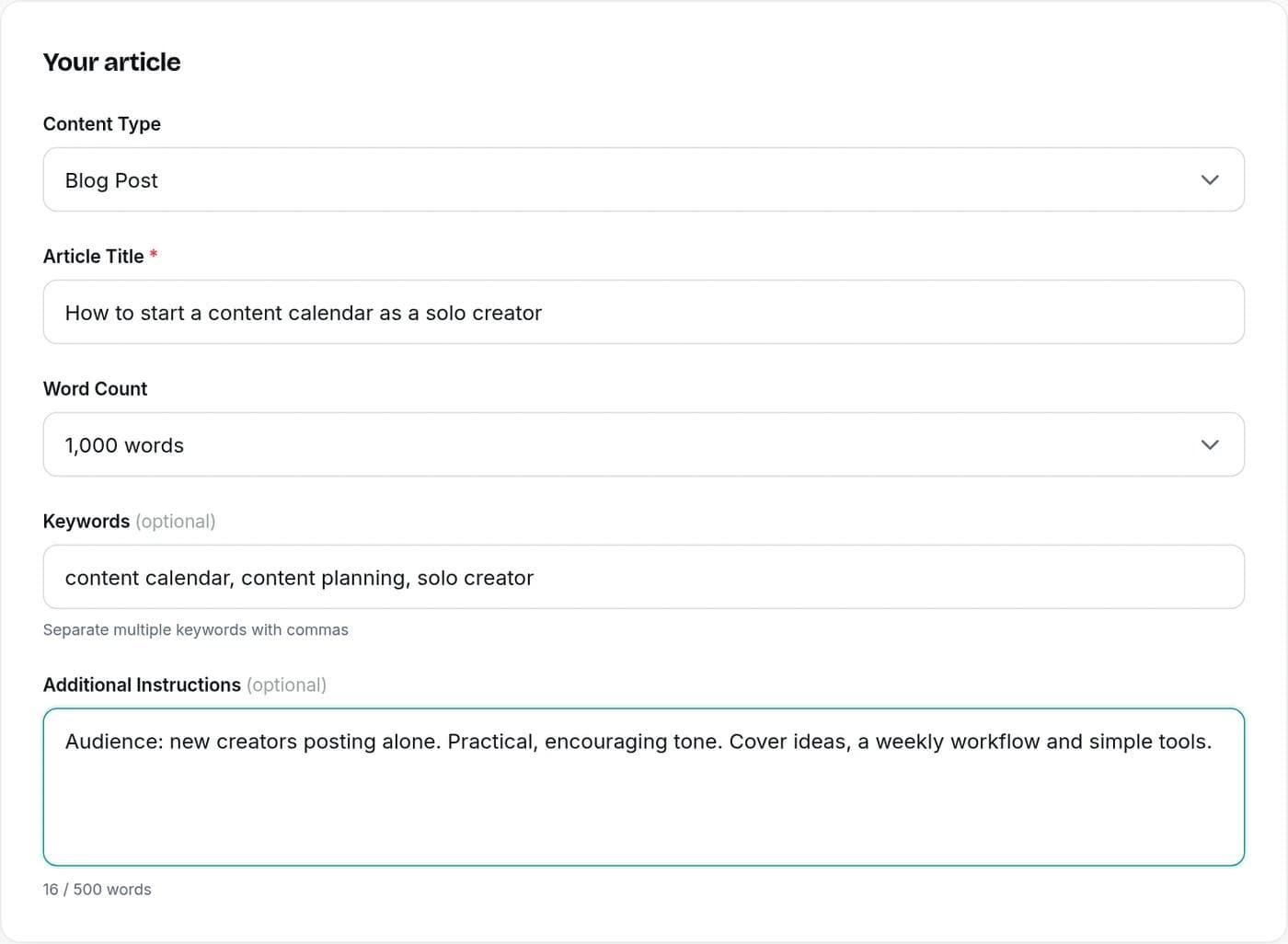
The AI Article Writer page covers every setting and how credits work in detail. For blog posts, three settings matter most:
- Content type: Blog Post for a general post, How-To Guide for steps, Listicle for numbered items, Opinion for a point of view, Case Study for results you supply.
- Keywords: the phrases you want the post to work in naturally, separated by commas.
- Extra instructions: your audience, the one point the post must make, and any facts or examples to use.
Pick the format that matches the search
Look at what already ranks for your keyword and match its format. A search for "how to start a content calendar" wants steps. "Best CRM for freelancers" wants a list. The Simple Writer's content types map to the formats blog posts usually take:
| Format | Works best for | Example title |
|---|---|---|
| Blog Post | Explaining a topic in depth | Why Your Blog Posts Aren't Getting Read |
| How-To Guide | Searches that start with "how to" | How to Start a Content Calendar as a Solo Creator |
| Listicle | "Best" and "ideas" searches | 12 Blog Post Ideas for a Local Bakery |
| Opinion or Thought Leadership | Building authority with a clear stance | Why Short Blog Posts Are Winning |
| Case Study | Showing results you can back up | How a Small Shop Doubled Its Organic Traffic |
| Newsletter | Turning a post into an email | This Week in Content Marketing |
Build the post around a keyword with the Advanced Writer
If you want the research done before the writing, use the Advanced Writer on a paid plan. It is a 7-step wizard:
| Step | What you do | Why it helps |
|---|---|---|
| 1. Basic info | Enter the topic, article type, location and language | Sets who the post is for |
| 2. References | Pick pages from the Google results for your topic | Shows what you are up against and gives the AI real sources to learn from |
| 3. Primary keyword | Choose from keywords the top reference page ranks for | Anchors the post on a search people actually make |
| 4. Secondary keywords | Add supporting keywords | Covers related searches in the same post |
| 5. Title | Choose from title ideas or write your own | Settles the headline before writing starts |
| 6. Outline | Set the length and edit the outline built from competitor articles | Lets you add, remove and reorder sections before any text is written |
| 7. Generate | Pick models and a brand voice | Writes the post from your outline |
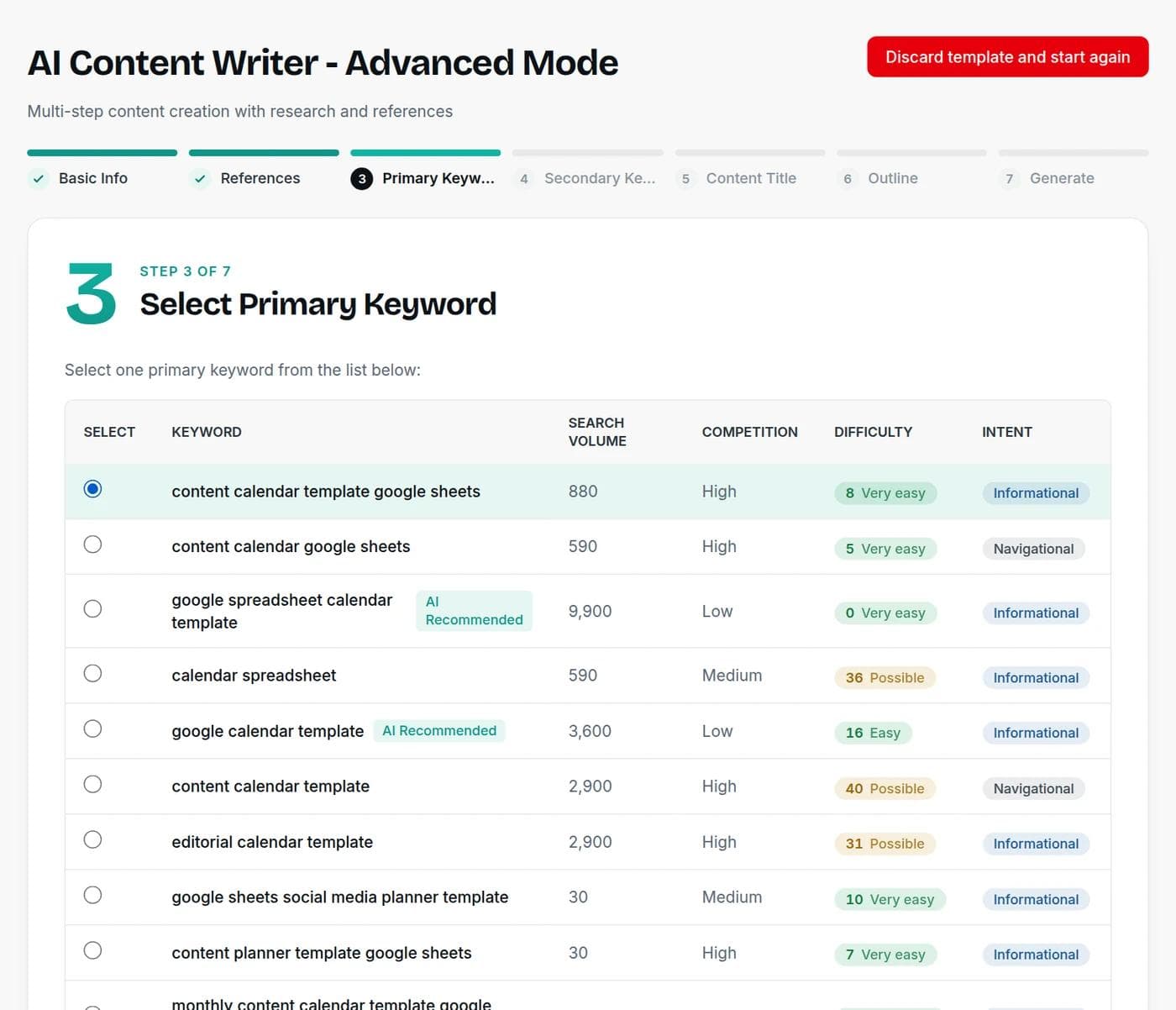
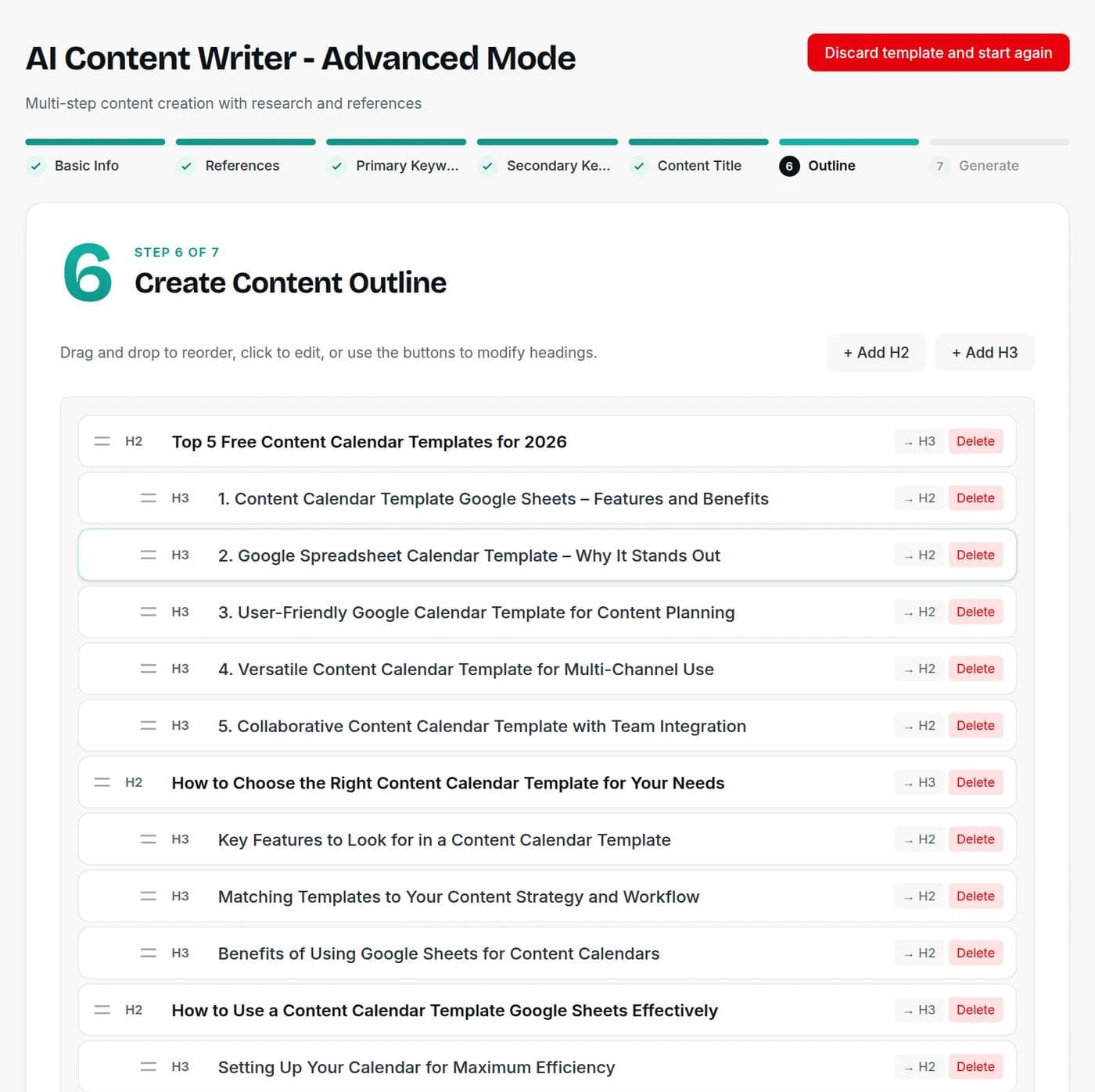
The research steps cost a few credits each, on top of the article itself. You see the price before each step runs.
Credits needed for one blog post, by length
A 500-word post costs 5 credits and a 3,000-word post costs 30, for one model. Each extra model writes its own draft and costs the same again.
View the numbers
| Item | Value (credits) |
|---|---|
| 500 words | 5 |
| 1,000 words | 10 |
| 1,500 words | 15 |
| 2,000 words | 20 |
| 2,500 words | 25 |
| 3,000 words | 30 |
Free includes 5,000 words a month. Paid plans run from 200,000 to 700,000, starting at $7.50 a month billed yearly. See the pricing page for details.
From first draft to publishable post
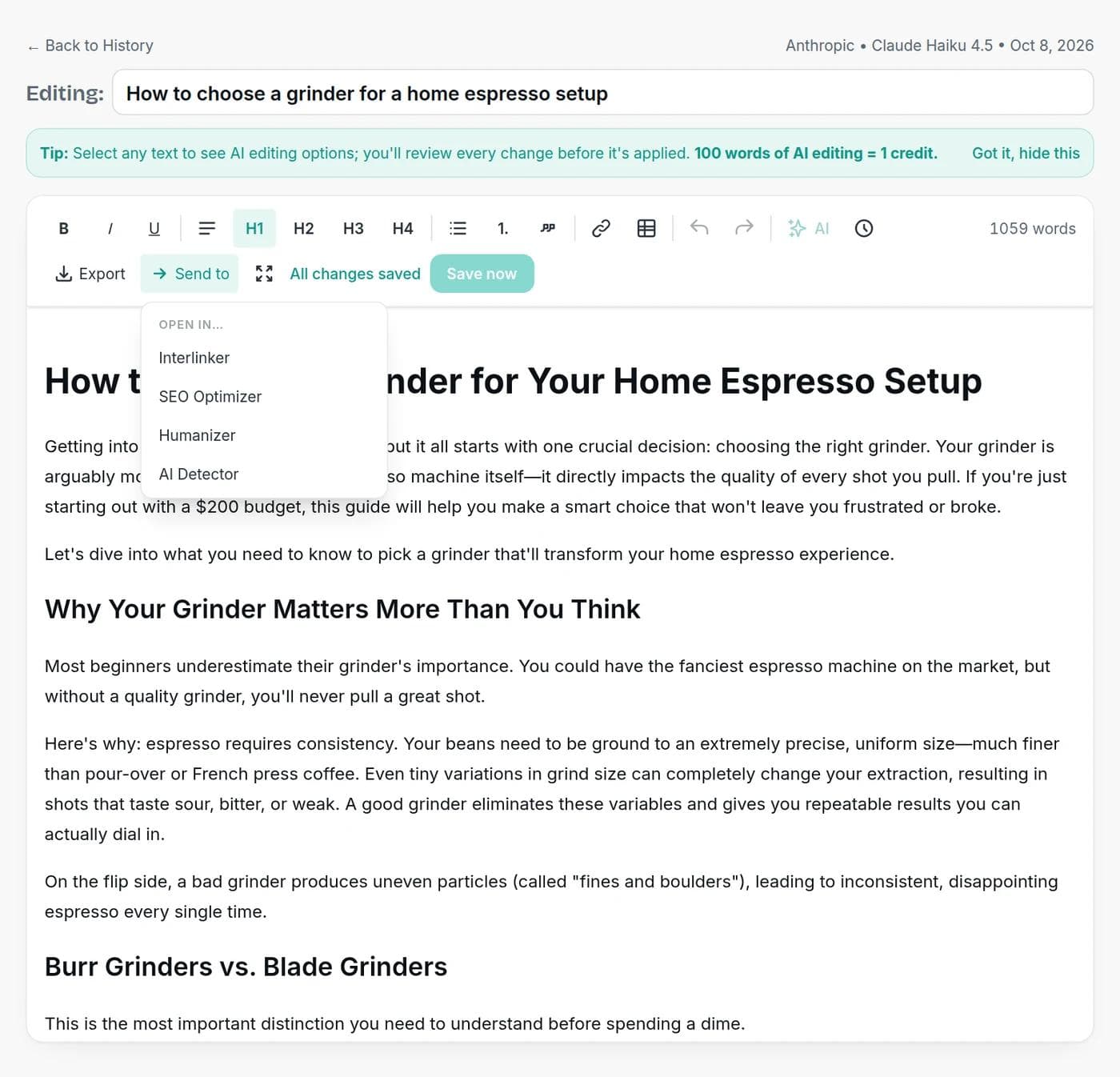
A draft is where the work starts. Open any generated post in the editor and select text to see AI editing options, which you review before they apply. Then use Send to to move the same post through the rest of the checklist:
- SEO Optimizer: reoptimize the article with SEO keywords to improve its chances of ranking.
- Interlinker: add links to the post, with control over placement, from light edits to new copy and anchor text.
- Humanizer: smooth stiff phrasing so it reads like you.
- AI Detector: see which passages read as machine-written, and rewrite those.
When you are done, export with formatting, as HTML or Markdown, or download a Word, HTML, Markdown or text file and paste it into your CMS.
What makes an AI-written post worth publishing
Google does not penalize content for being written with AI. Its guidance says generative AI can be useful for researching a topic and adding structure to original content, and warns against producing many pages that add no value for readers. It also says outputs can contain inaccuracies and should be fact-checked before publishing. Read it in Google's guidance on AI-generated content.
So before you publish, make sure the post has something a template could not give it:
- One real example, story or number from your own work.
- A clear promise in the first paragraph, and a post that keeps it.
- Facts you checked, with links to the sources.
- Internal links to your related posts, and a next step for the reader.
- A title and meta description written for people. Try the blog title generator and meta description generator.
When an AI blog writer is the wrong tool
Skip it for posts that depend on what only you know: original research, interviews, first-hand reviews, breaking news, or advice where a mistake is costly, such as medical, legal or financial topics. Write the substance yourself and use the tool for outlines and tidying. For a shorter, more general format, try the AI article writer, or plan first with the outline generator and blog post ideas tool.
Frequently asked questions
Writingful for your kind of writing
See how Writingful helps with the content you write most, by use case and by industry.

Press Release Writing
Draft clear, factual press releases in minutes, from the facts and quotes you approve.
- Product and service launches
- Company news
- Event announcements

Essay Writing
Brainstorm, outline, and revise essays faster, and stay inside your school's rules on academic integrity.
- Brainstorming and angles
- Thesis statements
- Essay outlines

Story Writing
Brainstorm plots, draft scenes, and write short stories faster, then make them your own.
- Short story drafts
- Scene and dialogue
- Character profiles and backstories

Accountants
Write client emails, tax-season updates, and firm blog posts faster, while keeping client data and professional rules in view.
- Firm blog posts and tax explainers
- Service pages
- Client deadline emails

Automotive
Write vehicle descriptions, service pages, and local content faster, with pricing and offer claims you can stand behind.
- Vehicle descriptions
- Service and repair pages
- Dealership and shop blog posts

Sports & Entertainment
Write game recaps, event promotions, show notes, and bios faster, with facts you supply and credit where it is due.
- Game previews and recaps
- Event and ticket promotion
- Podcast and video descriptions