
Free AI Article Writer
Write your next article with our free AI article writer.
Free AI Article WriterKey Takeaways
Enter a topic, pick a length from 500 to 3,000 words, and get a full article draft in minutes.
Free plan: 5,000 words a month, no credit card. Sign in with Google to start.
Pick several AI models for one article and compare the drafts side by side.
Treat the draft as a first version. Facts, examples and your own voice still need a human pass.
What an AI article writer does, and what it doesn't
A generic AI article writer turns a topic into a structured draft: an introduction, headed sections and a conclusion. It saves you the blank page and the first hour of structuring. It does not know your customers, your numbers or your opinions, and it can state wrong facts with full confidence. The good workflow is: generate, then edit.
Writingful's article writer is built around that workflow. You set the topic, length, language, audience and instructions, then choose which AI models write it. The result lands in your account, ready to edit.
How to write an article with Writingful in 4 steps
Step 1: Enter your topic
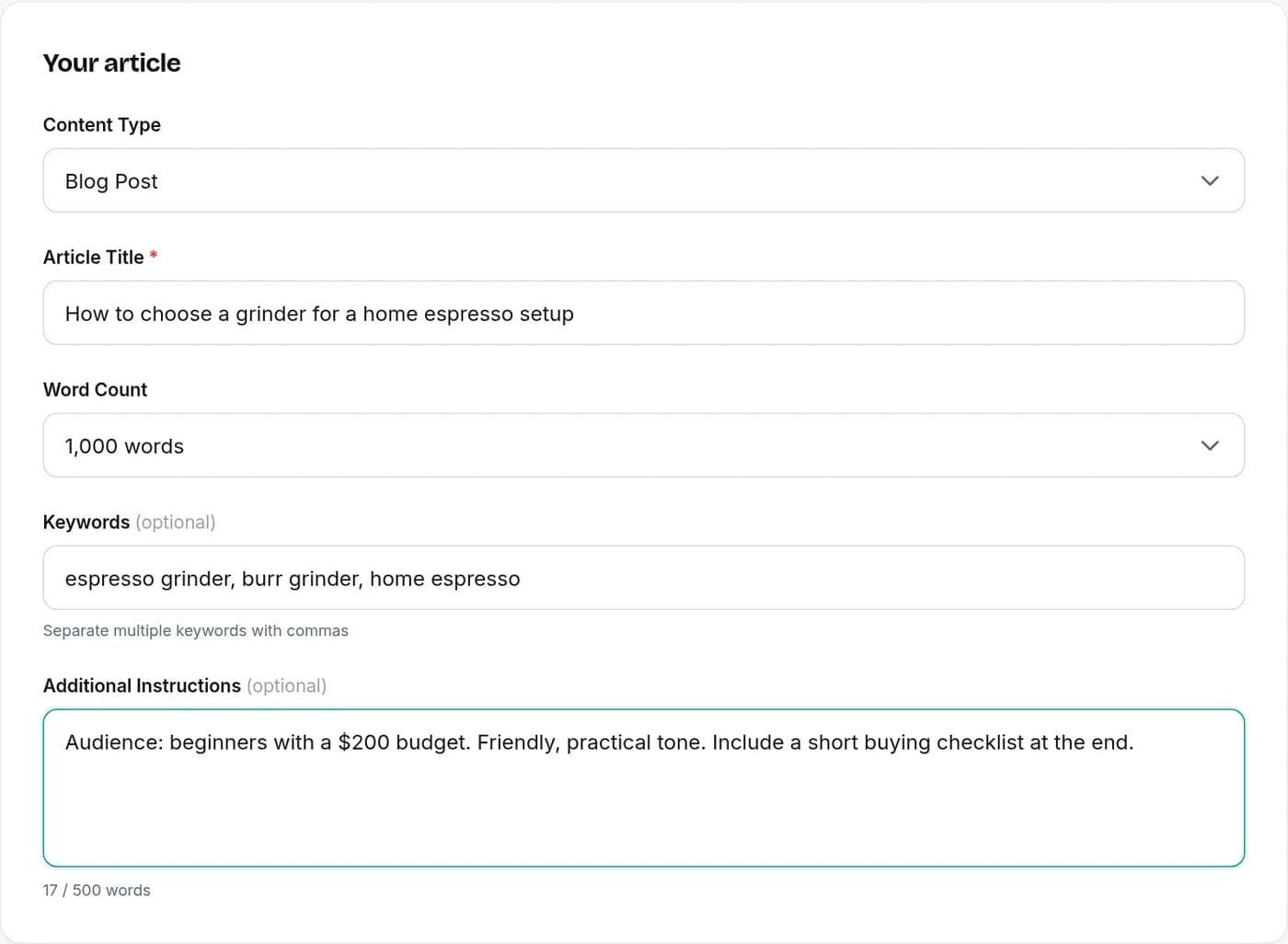
Type the article title or topic into the box above and pick a length. You'll sign in with Google (free, no card needed) and land in the Simple Writer with your topic already filled in.
Step 2: Choose the type and add details
Pick a content type: blog post, listicle, how-to guide, newsletter, product description, press release, case study, landing page, opinion piece or other. Add target keywords, the country you're writing for, the language and the point of view. Use the instructions box for anything specific, such as the audience, the tone, sections that must appear, or facts the AI should use.
Step 3: Choose your AI models
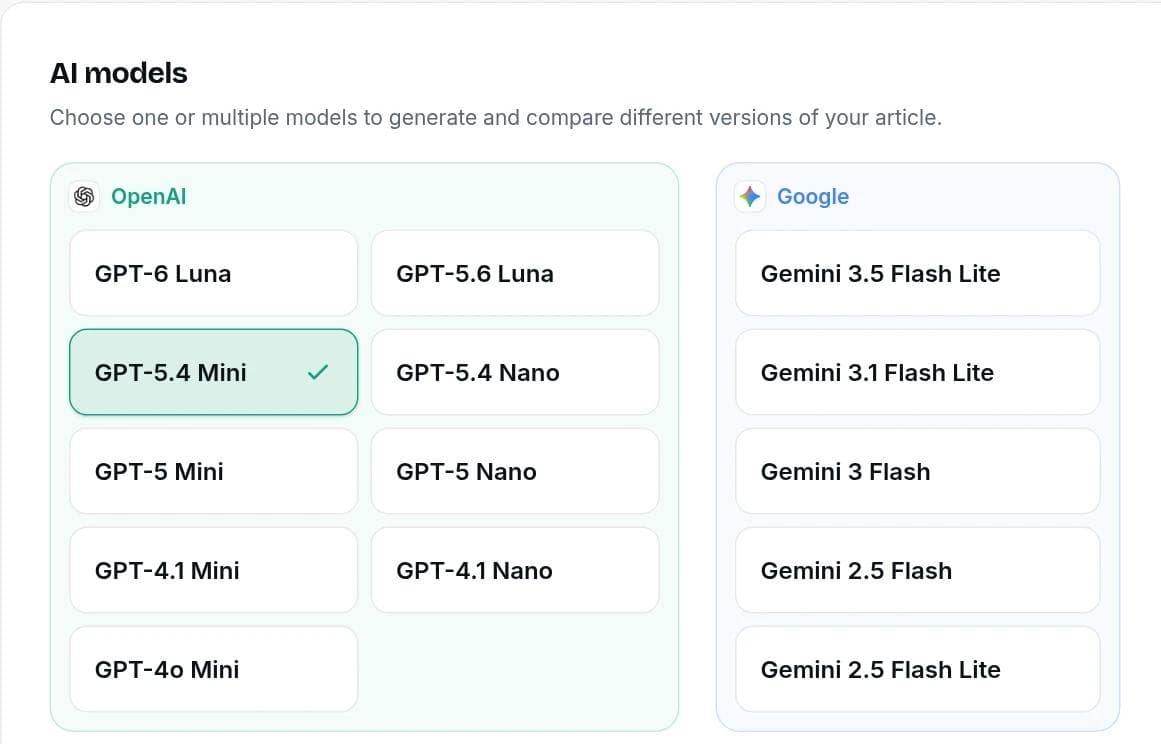
Select one model or several. Each selected model writes its own version of the article, so you can compare them and keep the best parts. Premium and Ultra unlock all 18 models from 5 providers.
Step 4: Generate, then edit
Click generate and each draft appears in your history. Open one in the editor: it has headings, lists, links and tables, and you can select any text to see AI editing options. You review every change before it's applied, and AI edits cost 1 credit per 100 words.
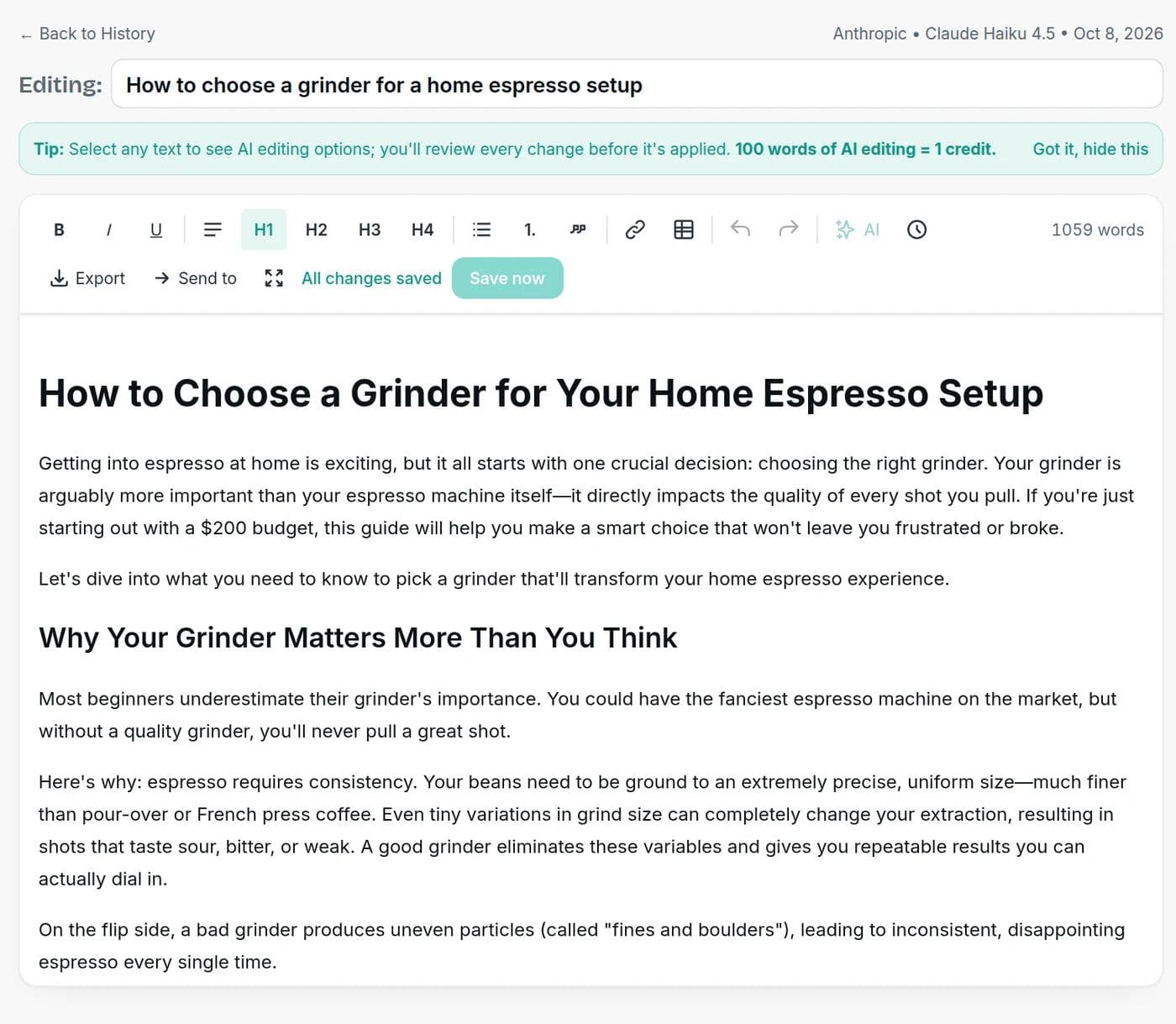
When the draft is ready, Export copies it with formatting, as HTML, as Markdown or as plain text, or downloads it as a Word (.doc), HTML, Markdown or text file. Send to opens it in the Interlinker, SEO Optimizer, Humanizer or AI Detector, so improving the draft is one click away. Replace generic lines with your own examples and check every fact before you publish.
What you can control
The Simple Writer is quick, but it is not a one-size-fits-all box. These are the settings that change the output:
| Setting | What it changes |
|---|---|
| Content type | The structure of the draft, for example a how-to guide with steps versus a listicle with numbered items. |
| Length | 500 to 3,000 words. The Free plan is capped at 1,000 words per article. |
| Target keywords | Terms the article should work in naturally. Separate several with commas. |
| Language and country | Over 25 languages, plus the country you are writing for, so the draft is localized for that audience. |
| Point of view | First person, second person or third person, so the article matches your site. |
| Industry | Adds context for your field, such as law, real estate or healthcare. |
| Brand voice | Apply a saved voice profile so drafts sound like your brand and not like a generic AI. |
| Extra instructions | Anything else: audience, tone, sections to include, facts to use, things to avoid. |
Write the same article with several models and compare
Different models write differently. One might be tighter, another warmer, another better at structure. Instead of guessing which to use, select two or three and generate them together. You read the drafts next to each other and keep the strongest intro from one and the best section from another.
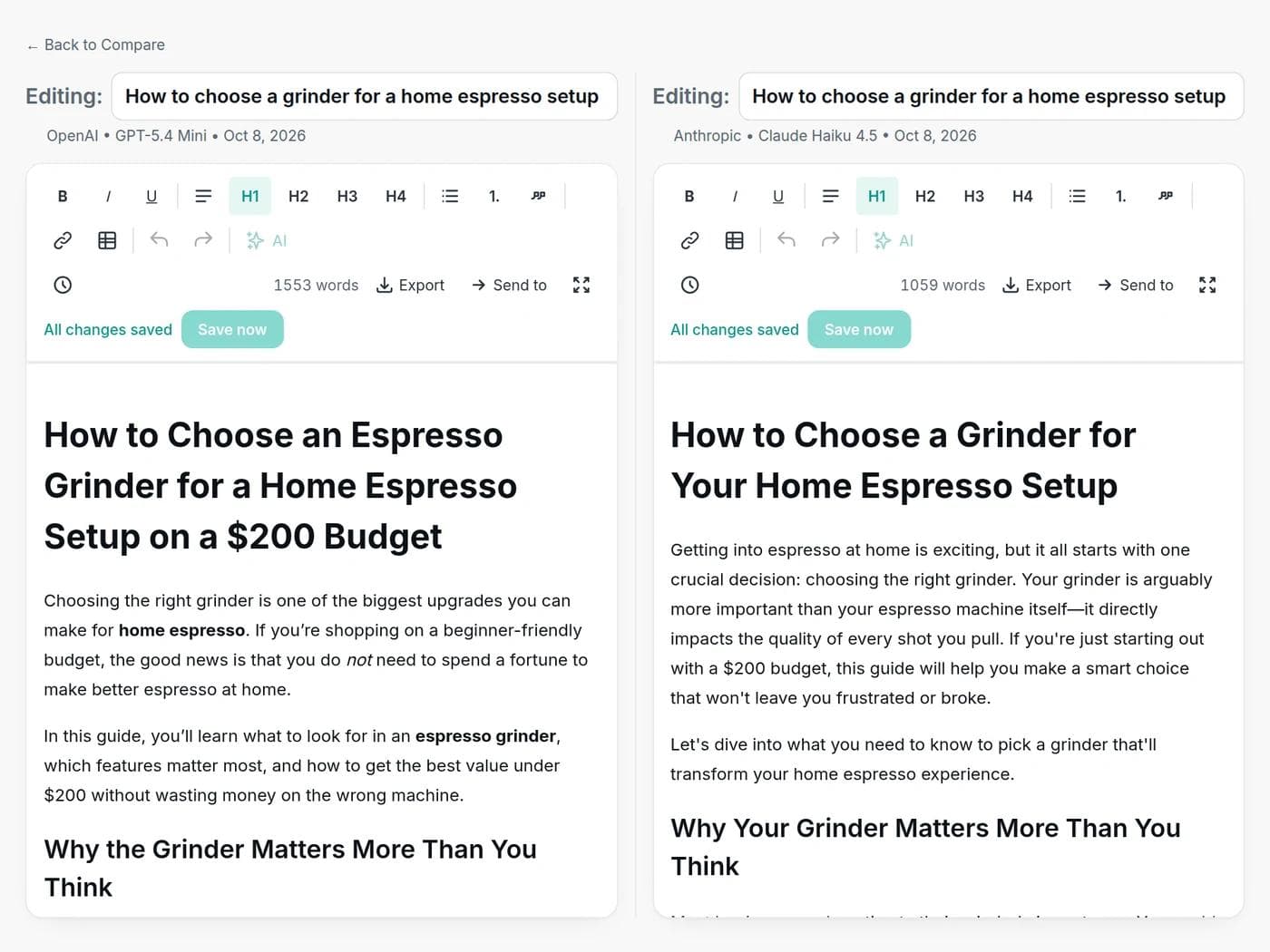
We tried it with one prompt, a 1,000-word beginner's guide to choosing a home espresso grinder. One model returned about 1,550 words and the other about 1,060, with a different title, a different opening and a different structure. Neither is wrong. They are two starting points, and seeing both is how you choose. Use the Compare page in your dashboard to open any two drafts next to each other.
It uses credits, so plan for it. A credit is 100 words of output, and each model counts separately. A 1,000-word article costs 10 credits per model, so three models cost 30 credits. On the Free plan that is a good way to test models on one important article rather than spreading credits across many.
How much can you write on each plan?
Free includes 50 credits a month, which is 5,000 words. Paid plans start at $7.50 a month billed yearly, or $9 billed monthly.
Words you can generate each month, by plan
Free gives you 5,000 words a month, enough for a few full articles. Paid plans range from 200,000 to 700,000 words.
View the numbers
| Item | Value (words) |
|---|---|
| Free | 5,000 |
| Starter | 200,000 |
| Premium | 450,000 |
| Ultra | 700,000 |
| Plan | Price | Words per month | Models |
|---|---|---|---|
| Free | $0, no card | 5,000 | A selection of models |
| Starter | $9/month ($7.50 billed yearly) | 200,000 | Most models, plus the step-by-step Advanced Writer |
| Premium | $18/month ($15 billed yearly) | 450,000 | All 18 |
| Ultra | $27/month ($22.50 billed yearly) | 700,000 | All 18 |
See the full pricing page for credit top-ups and everything each plan includes.
What to look for in a free AI article writer
"Free" can mean very different things. Before you pick a tool, check these points:
| Check | Why it matters | Writingful |
|---|---|---|
| Monthly or daily limit | Some free tools cap you at a few uses a day, others at a number of words a month. It decides how much you can really publish. | 5,000 words a month |
| Article length | A 300-word cap is a blurb, not an article. | Up to 1,000 words per article on Free, 3,000 on paid plans |
| Model choice | Models differ in tone, accuracy and structure. One fixed model means one style. | Pick one or several and compare the drafts |
| Control over the output | Keywords, audience, language and a saved brand voice keep drafts from sounding generic. | All of these, plus a saved brand voice profile |
| Account required | An account is the price of saving your work and credits. Know it before you start. | Sign in with Google, no credit card |
| Editing and fact-checking | No tool makes a draft publish-ready. Look for one that treats the draft as a starting point. | Drafts open in your account for editing |
Prompts that get better drafts
The topic is the headline of the brief. The more specific it is, the less generic the draft. Compare:
| Weak input | Stronger input |
|---|---|
| coffee | How to choose a grinder for a home espresso setup, for beginners with a $200 budget |
| email marketing tips | Email subject line mistakes that hurt open rates, for ecommerce stores with under 5,000 subscribers |
| AI writing | How freelance writers can use AI for first drafts without losing their voice |
Then use the instructions box for what the topic can't carry:
- Audience: who reads this and what they already know.
- Angle: the one point the article must make.
- Must-include points: facts, products, examples or quotes you supply.
- Tone and style: practical, friendly, formal. A brand voice profile does this automatically.
- What to avoid: claims you can't back up, competitors you won't mention, topics out of scope.
Will Google penalize AI-written articles?
Not for being AI-written. Google's guidance says generative AI can be useful for researching a topic and adding structure to original content. What it warns against is using AI to mass-produce pages that add no value for readers, which it treats as scaled content abuse under its spam policies.
Google also says outputs can contain inaccuracies and that it is critical to fact-check and review AI-generated content before publishing. That review covers titles, meta descriptions and image alt text too. In practice, the articles that hold up are the ones where a person added real experience, checked the facts and published something worth reading. You can read the policy yourself in Google's guidance on AI-generated content.
Is it legal to use AI to write articles?
In general, yes. Using an AI tool to help write is not illegal, and many publishers and businesses do it. The open question is ownership. In the US, the Copyright Office's January 2025 report concluded that copyright does not extend to purely AI-generated material, and that prompts alone do not provide sufficient human control to count as authorship.
The same report says that using AI as an assistive tool does not affect protection for the result, and that human authors keep copyright in the expression they write, plus their creative selection, arrangement and modifications of AI output. The practical takeaway: write and edit enough that the finished article is yours. Read the Copyright Office report for the details. Rules differ by country and by context, such as schools, publishers and ad platforms, and this is not legal advice.
Can you tell if an article was written by AI?
Sometimes, but not reliably. Detectors estimate how likely a text is to be AI-generated. They can flag human writing and miss AI text that has been edited, so a score is a signal and not proof. Our AI content detector shows a likelihood score and the patterns behind it, which is most useful for finding stiff or repetitive passages to rewrite.
The better test is whether a reader would learn something. Specific examples, real numbers and a clear point of view make an article read as written by a person, whatever tool produced the first draft.
A 10-minute edit checklist
Run every draft through this before it goes live:
- Facts: verify every number, name, date and claim against a reliable source.
- Your experience: add an example, story or opinion only you can give. This is what separates your article from every other one on the topic.
- Search intent: read the headings and ask whether they answer what the reader came for.
- Voice: rewrite phrases that sound generic.
- Links: add internal links to your related posts and external links to credible sources.
- Title and description: write them for a human. Our blog title generator and meta description generator can give you options.
What it's good for
- How-to guides and explainers where the structure is predictable.
- Blog posts and listicles that you will personalize with examples.
- Product descriptions and landing page copy you can feed with real details.
- Newsletters and press releases where you supply the facts and the AI supplies the wording.
- First drafts in other languages, if you can review them or have someone who can.
When it's the wrong tool
Skip it, or use it only for structure, when the article depends on things the AI can't know: original research, first-hand reviews, interviews, breaking news, or advice where being wrong carries real risk, such as medical, legal or financial guidance. In those cases, write the substance yourself and let the tool help with outlines and tidying.
Need a different format? Try the AI blog writer for blog posts, the outline generator to plan before you write, or the text humanizer to smooth stiff phrasing.
Frequently asked questions
Writingful for your kind of writing
See how Writingful helps with the content you write most, by use case and by industry.

Story Writing
Brainstorm plots, draft scenes, and write short stories faster, then make them your own.
- Short story drafts
- Scene and dialogue
- Character profiles and backstories

SEO Content Writing
Research keywords, write articles, and optimize them for search in one place, without publishing thin content.
- Keyword research
- Article drafts
- Content outlines and briefs

Press Release Writing
Draft clear, factual press releases in minutes, from the facts and quotes you approve.
- Product and service launches
- Company news
- Event announcements

Real Estate Agents
Write listing descriptions, neighborhood guides, market updates, and blog posts in less time, with fair housing in mind.
- Listing descriptions
- Neighborhood and area guides
- Market updates and newsletters

Accountants
Write client emails, tax-season updates, and firm blog posts faster, while keeping client data and professional rules in view.
- Firm blog posts and tax explainers
- Service pages
- Client deadline emails

Automotive
Write vehicle descriptions, service pages, and local content faster, with pricing and offer claims you can stand behind.
- Vehicle descriptions
- Service and repair pages
- Dealership and shop blog posts