
Free Paragraph Rewriter
Use our free paragraph rewriter to rewrite your text with better clarity and a tone that fits your audience.
Free Paragraph RewriterKey Takeaways
Paste one paragraph and get three rewrites that work on structure and flow: the main point earlier, a clearer order, less repetition and tighter sentences.
Rewriting goes further than rewording. Word choice changes, and so do the order and shape of the ideas.
Read the versions against your original. In our test, all three added a small point that the original never made.
It works on one paragraph at a time. A paragraph of about 75 words cost 3 credits (about 1 credit per 100 words in and out). The Free plan includes 5,000 words a month.
What rewriting a paragraph means
A paragraph can have the right ideas and still read badly: the point is buried at the end, one idea appears twice, the sentences are all the same length, or nothing links one to the next. Rewriting a paragraph fixes that. The paragraph rewriter takes one paragraph and writes it three ways, with a clearer structure, while keeping what you said.
People use "reword", "paraphrase" and "rewrite" as if they were the same. They are not:
| Task | What changes | What stays | Length |
|---|---|---|---|
| Reword or rephrase | Word choice and phrasing | Order and structure | About the same |
| Paraphrase | Words and sentence structure | Meaning | About the same |
| Rewrite | Order, emphasis, flow, wording | The core message | Often shorter |
| Summarize | Almost everything, shortened | The main points | Much shorter |
For fresh wording without changing the structure, use the rewording tool. To fix one problem in one sentence, use the sentence rewriter. You sign in with Google when you run this tool, free and with no card.
How to rewrite a paragraph in 4 steps
Step 1: Paste one paragraph
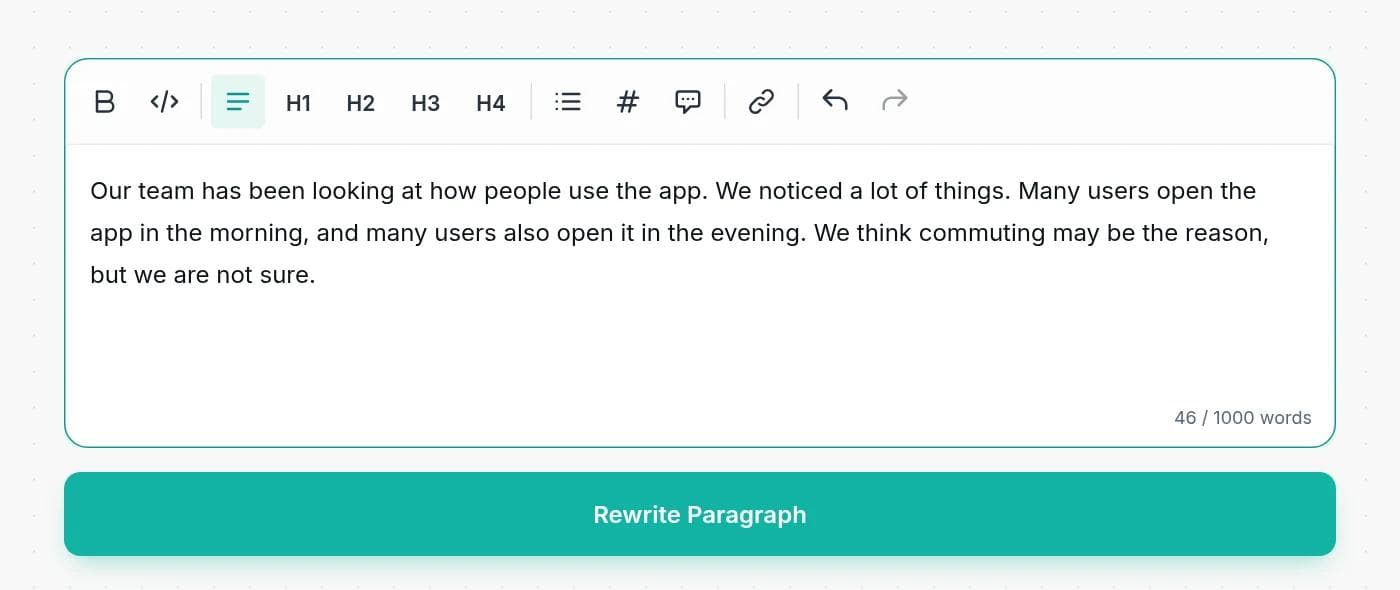
Paste a single paragraph into the box. The page takes up to 1,000 words, but the tool is built for one paragraph at a time. If you paste several, each version merges them into one, so do them separately.
Step 2: Say what you want, if you want something
Add a line before the paragraph, such as "Make this friendlier:" or "Rewrite for a busy manager, about 60 words:". With no instruction it makes the paragraph clearer and better organized.
Step 3: Click Rewrite Paragraph
Three versions appear in a few seconds, each a single paragraph. You can edit them in place and use Copy to Clipboard to take the one you like, or combine the best sentences from each.
Step 4: Check it against the original
Read the version next to your paragraph. Check the facts, the numbers and how sure each statement sounds.
Signs a paragraph needs rewriting
- The point comes last. The reader has to get to the end to learn why the paragraph exists.
- The same idea appears twice in slightly different words.
- Every sentence is about the same length, so the paragraph reads like a list of statements.
- Nothing connects the sentences. The reader has to guess how one leads to the next.
- It carries two or three ideas. Split it, or ask for a rewrite around the main one.
A real example, and what to check
We pasted this paragraph, which buries its main point and repeats itself:
Original: Our team has been looking at how people use the app. We noticed a lot of things. Many users open the app in the morning, and many users also open it in the evening. We think commuting may be the reason, but we are not sure. The most important thing we found is that most sessions are very short, so the app has to be fast. Some users stay longer, but there are fewer of them.
The tool returned three versions:
- Our team has been analyzing user behavior within the app and identified several key patterns. A large number of users tend to open the app during the morning and evening, possibly due to commuting routines, although this is not certain. The main takeaway is that most sessions are quite brief, emphasizing the need for a fast, responsive app. While some users spend more time on it, they are fewer in number, highlighting the importance of optimizing for quick interactions.
- We have observed how users engage with the app, noticing that many open it in the morning and evening, which we suspect correlates with commuting times, though we lack confirmation. The primary insight is that the majority of sessions are very short, so performance must be optimized for speed. A smaller group of users stays longer, but they represent a minority, so prioritizing quick-loading features is crucial for overall satisfaction.
- Our analysis of app usage reveals that users frequently access it during morning and evening hours, possibly linked to commuting, but this is not definitive. A key finding is that most sessions are brief, necessitating a very fast app experience. Although a few users remain longer, they are less common. Therefore, ensuring rapid load times should be a top priority to accommodate the majority of users.
What improved: the repetition is gone, "a lot of things" became something specific, and the point (sessions are short, so the app must be fast) is easier to find. Version 3 is the tightest.
What to check: the tool still adds a little. Version 1 says "identified several key patterns", which the original did not claim. Version 2 ends with "prioritizing quick-loading features is crucial for overall satisfaction", a reason the original never gave. Version 3 ends with a recommendation about load times. The uncertainty about commuting survived in all three, but "we suspect" in version 2 is a little stronger than "may be". Cut any ending you did not write.
Ask for the rewrite you need
| What you want | Add this line before the paragraph |
|---|---|
| Main point first | Start with the main point: |
| Shorter | Rewrite in about 60 words: |
| Plainer | Rewrite for someone with no background: |
| Friendlier | Make this friendlier: |
| More formal | Rewrite more formally: |
| Less repetition | Remove the repetition and keep everything else: |
| Details must stay | Keep the numbers and names exactly as written: |
How to rewrite a paragraph by hand
Whatever tool you use, the steps are the same, and it helps to know them so you can judge what the tool gives you:
- Find the main point and write it in one sentence.
- Put that point first, or very near the start.
- Cut anything that repeats it, and anything that belongs to a different idea.
- Order what is left so each sentence leads to the next.
- Add a short link where the reader needs one, such as "so", "but" or "as a result".
- Read it aloud and cut anything you trip over.
Is rewriting a paragraph cheating?
Rewriting your own paragraph is ordinary editing, like asking a colleague to suggest a cleaner version. Rewriting someone else's paragraph is different: the ideas are still theirs, so you must credit them however different the words are. Many schools and employers also set rules on AI tools, so check yours before you submit anything. Using a rewriter does not make the work yours. Your own thinking and sources do.
What we found when we tested it
We tightened the tool's instructions and tested it. These are the results:
- Three versions every time. Across 12 runs on the example above, with no instruction, "more formal" and "friendlier", every run returned three versions and none added a heading or label.
- Length instructions apply to each version. Asked for "about 60 words", the versions came out at 51 to 69 words each.
- One paragraph in, one paragraph out. When we pasted two short paragraphs, each version merged them into one.
- Facts stayed. Dates, times and counts (a launch on May 5, an email on April 20, two extra agents until 9 pm) were kept in the versions we checked.
- Small additions remain. Closing remarks and "key insights" appear even though the instructions say not to add them. Delete them.
What it costs
Free tools run on your monthly credits. The charge is about 1 credit per 100 words of text, counting both what you paste and the three versions, with a minimum of 1 credit. In our test, a 76 word paragraph cost 3 credits. Free accounts get 5,000 words a month and paid plans start at $7.50 a month billed yearly. See the pricing page.
When a paragraph rewriter is the wrong tool
Do not use it on quotations, legal terms, contracts or instructions where order matters. Do not use it to hide copied text. And do not expect it to fix a paragraph with no clear point: if you cannot say in one sentence what the paragraph is for, work that out first.
To write a new paragraph from scratch, try the paragraph generator. To make a thin paragraph longer, use the paragraph expander. For an AI-sounding draft, the text humanizer is on paid plans.
Frequently asked questions
Writingful for your kind of writing
See how Writingful helps with the content you write most, by use case and by industry.

Press Release Writing
Draft clear, factual press releases in minutes, from the facts and quotes you approve.
- Product and service launches
- Company news
- Event announcements

Essay Writing
Brainstorm, outline, and revise essays faster, and stay inside your school's rules on academic integrity.
- Brainstorming and angles
- Thesis statements
- Essay outlines

Story Writing
Brainstorm plots, draft scenes, and write short stories faster, then make them your own.
- Short story drafts
- Scene and dialogue
- Character profiles and backstories

Law Firms
Plan, draft, and polish blog posts, practice-area pages, and attorney bios faster, then review every word before it goes live.
- Blog posts that answer client questions
- Practice-area pages
- Local and jurisdiction pages

Software & Tech
Write blog posts, docs, release notes, and landing pages faster, and keep your technical claims accurate.
- SaaS blog posts and tutorials
- Landing and feature pages
- Documentation drafts

Restaurants
Write menu descriptions, specials, newsletters, and local blog posts faster, without risking an allergen or nutrition mistake.
- Menu descriptions
- Specials and event posts
- Social media captions