
Free Sentence Rewriter
Use our free sentence rewriter to rewrite sentences with clearer tone and flow.
Free Sentence RewriterKey Takeaways
Paste one sentence, say what is wrong with it, and get three rewrites in seconds.
It works best when you name the problem: "too long", "passive", "more formal", "under 15 words". With no instruction it does a general clarity pass and can leave filler in.
It is set to keep names, numbers, citations and technical terms as written. In our tests a citation stayed exactly as written in 29 of 33 versions, so check it.
A sentence is usually 1 credit: about 1 credit per 100 words of text in and out. The Free plan includes 5,000 words a month.
What the sentence rewriter does
The sentence rewriter takes one sentence and writes it three different ways, keeping the meaning. It is meant for the small, stubborn problem: a sentence that runs on, hides its subject, sounds too casual for the reader, or says the same thing twice. You tell it what to fix and compare the versions.
It works on pasted text. For a whole paragraph, the paragraph rewriter is a better fit, and for general rewording of any length, use the rewording tool. You sign in with Google when you run it, free and with no card.
How to rewrite a sentence in 4 steps
Step 1: Paste the sentence
Paste one sentence into the box. A sentence or two works best. The page takes up to 1,000 words, but long text is better handled by the paragraph rewriter.
Step 2: Say what is wrong
Add a short line before the sentence, such as "Make this shorter:" or "Rewrite in active voice:". The box is one editor, so the instruction and the sentence go in together.
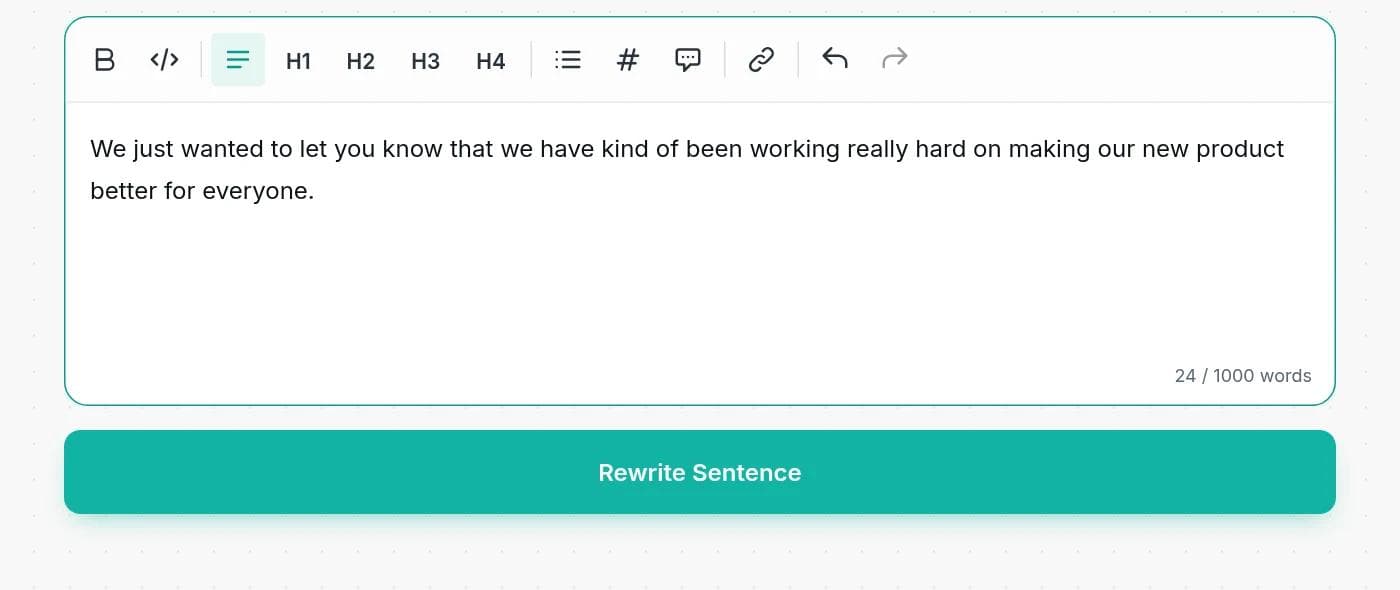
Step 3: Click Rewrite Sentence
Three versions appear in a few seconds, each as its own paragraph. You can edit them in place and use Copy to Clipboard to take the one you like.
Step 4: Compare with the original
Read each version next to your sentence. Check that the meaning, the numbers and the strength of every claim are the same.
Name the problem you want fixed
There are no mode buttons. You steer the tool with one line, so you can ask for exactly what you need:
| The problem | Add this line before your sentence |
|---|---|
| Too long or wordy | Make this shorter: |
| A hard word limit | Rewrite in under 15 words: |
| Passive voice | Rewrite in active voice: |
| Filler words | Cut the filler and keep the meaning: |
| Too casual | Make this more formal: |
| Too stiff | Make this friendlier and more direct: |
| Hard to follow | Rewrite for a ten year old: |
| Run-on sentence | Split this into two clear sentences: |
Four real rewrites, and what to check
We ran the tool on four common problems. These are the actual results from one run each.
1. Filler, with no instruction
Original: We just wanted to let you know that we have kind of been working really hard on making our new product better for everyone.
- We want to inform you that we've been putting a lot of effort into improving our new product for everyone's benefit.
- Just a quick note to let you know that we've been working diligently to enhance our new product for all users.
- We've been working hard to make our new product better for everyone, and we wanted to keep you updated on that.
What to check: With no instruction the tool made the sentence smoother but kept the filler ("just a quick note", "we wanted to keep you updated"). Version 2 also narrowed "everyone" to "all users". Telling it to cut the filler gave a cleaner result: "We've been working hard to improve our new product for everyone."
2. Passive voice
Original, with "Rewrite in active voice:": The new policy was announced by the director, and it was widely criticized by employees who felt that they had not been consulted.
- The director announced the new policy, but employees widely criticized it, feeling they had not been consulted.
- The director announced the new policy, which employees criticized heavily because they felt they had not been consulted.
- The director announced the new policy, but employees, who felt unconsulted, criticized it widely.
What to check: All three are active and keep the facts. Version 2 turns "widely criticized" into "criticized heavily", which is a different claim: many people versus strong criticism.
3. Too long
Original, with "Make this shorter:": The report was written by our team after the data had been collected over a period of three months by several of the volunteers who work with us.
- The report was written by our team after three months of data collection by several volunteers.
- Our team authored the report following three months of data collection by volunteers.
- After three months of volunteer-led data collection, our team prepared the report.
What to check: Version 1 keeps the passive voice, so ask for both shorter and active if you want both. Versions 2 and 3 drop "several", which loses a detail. If the detail matters, say so: "Make this shorter, keep 'several volunteers'."
4. Too casual for the reader
Original, with "Rewrite in a formal academic tone:": The results were kind of surprising and showed that kids who sleep less do worse on tests.
- The findings were somewhat unexpected and indicated that children who obtain less sleep tend to perform worse on assessments.
- The results, which were somewhat surprising, demonstrated that children with reduced sleep duration score lower on examinations.
- Unexpectedly, the data revealed that children who sleep less exhibit poorer performance on tests.
What to check: The tone is right in all three, but the strength of the claim moved. "Tend to perform worse" is softer than the original. "Demonstrated" and "revealed" are stronger than "showed". In formal writing, those verbs make a promise, so choose the one your evidence supports.
Rewriting sentences in academic writing
Sentence rewriters are popular for essays and papers, so we tested the case that matters there: a long sentence with a citation and a technical term. We ran the tool 11 times on this sentence: "The study found that sleep deprivation reduces working memory (Smith, 2020), which the authors attribute to prefrontal cortex dysfunction, although the sample was small, and so the results should be treated with caution until they are replicated in larger cohorts."
- Technical terms: "prefrontal cortex" was kept in all 33 versions.
- The citation: "(Smith, 2020)" stayed exactly as written in 29 of 33 versions. In the other four it was dropped or changed.
- Hedging: "which the authors attribute to" often became "likely due to" or "probably because of". That moves the claim from the authors to the writer, which matters in a paper.
So the tool is useful for tightening a sentence, but read each version against your source and put the citation back if it goes missing. It is not a grammar checker, and it does not make borrowed text yours. If a sentence comes from another source, you still need to cite it however well it is reworded. Follow your institution's rules on AI tools.
Sentence rewriter, paragraph rewriter or rewording tool?
| Tool | Use it when | What it changes |
|---|---|---|
| Sentence rewriter | One sentence has one clear problem | That sentence: length, voice, tone, clarity |
| Paragraph rewriter | A paragraph is out of order, repetitive or hard to follow | Structure and flow across several sentences |
| Rewording tool | You want fresh wording for text of any length | Word choice and phrasing, same structure |
Tips for better rewrites
- One problem at a time. "Shorter and active and formal" gets muddy. Fix one, then the next.
- Keep what must stay. Add "keep the words 'several volunteers'" for details you cannot lose.
- Read aloud. If you would not say the sentence, change it.
- Do not rewrite the same sentence repeatedly. Each pass drifts a little further from what you meant.
What it costs
Free tools run on your monthly credits. The charge is about 1 credit per 100 words of text, counting both what you paste and the three versions, with a minimum of 1 credit. A single sentence usually costs 1 credit, and a long sentence like the academic example about 2. Free accounts get 5,000 words a month and paid plans start at $7.50 a month billed yearly. See the pricing page.
When a sentence rewriter is the wrong tool
Do not use it to change legal wording, instructions where order matters, or quotations, which must stay exactly as spoken. Do not use it to fix a sentence that is unclear because the idea is unclear: rewriting makes it smoother, not clearer. And if a sentence has a grammar error, fix the error yourself first.
Frequently asked questions
Writingful for your kind of writing
See how Writingful helps with the content you write most, by use case and by industry.

SEO Content Writing
Research keywords, write articles, and optimize them for search in one place, without publishing thin content.
- Keyword research
- Article drafts
- Content outlines and briefs

Press Release Writing
Draft clear, factual press releases in minutes, from the facts and quotes you approve.
- Product and service launches
- Company news
- Event announcements

Essay Writing
Brainstorm, outline, and revise essays faster, and stay inside your school's rules on academic integrity.
- Brainstorming and angles
- Thesis statements
- Essay outlines

Construction
Write service pages, project write-ups, and customer emails faster, and keep license and warranty details accurate.
- Service pages
- Project write-ups
- Local blog posts

Law Firms
Plan, draft, and polish blog posts, practice-area pages, and attorney bios faster, then review every word before it goes live.
- Blog posts that answer client questions
- Practice-area pages
- Local and jurisdiction pages

Software & Tech
Write blog posts, docs, release notes, and landing pages faster, and keep your technical claims accurate.
- SaaS blog posts and tutorials
- Landing and feature pages
- Documentation drafts