
Free Paragraph Generator
Use our free paragraph generator to create several unique paragraph drafts you can choose from.
Free Paragraph GeneratorKey Takeaways
Describe the paragraph you need, with the topic, audience, tone and length. You get three different drafts in seconds, so you can pick the best one or combine them.
The more you tell it, the better the paragraph. A single line with a topic gives you something generic.
It writes fluent text, not verified text. The tool is set not to invent citations or named sources, but its examples are generic and AI writers elsewhere do invent sources. Check every fact, name and link before you publish.
It runs on your monthly credits: about 1 credit per 100 words of text in and out, and a run writes three drafts. The Free plan includes 5,000 words a month.
What the paragraph generator does
The paragraph generator turns a short description into a paragraph you can edit. You say what the paragraph should be about and who it is for, and the tool writes a draft. Use it to get past a blank page, to draft a section of a blog post, to try a different angle on a point, or to see how a paragraph could be built before you write your own.
It works from what you type. It does not search the web, read your other documents or know your business, so any specific fact has to come from you. You sign in with Google when you run it, free and with no card.
How to generate a paragraph in 4 steps
Step 1: Describe the paragraph
Type your request in the box. Start with what the paragraph should do, then add the audience, the tone and the length. For example: "Write a clear 100 to 120 word paragraph explaining the basics of email marketing for small business owners, in a friendly and practical tone."
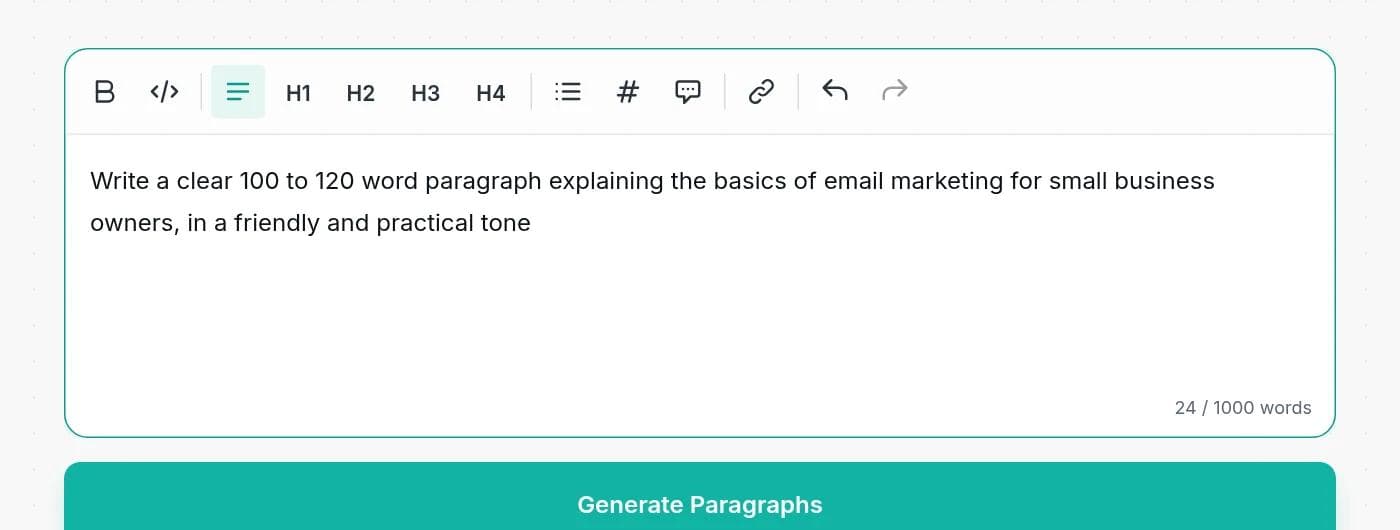
Step 2: Click Generate Paragraphs
Three drafts appear in a few seconds. They follow the same brief but open differently and take different angles. If you ask for another number, such as "write 2 paragraphs", it follows that instead.
Step 3: Pick one and edit it into your own
The output box is an editor. Choose the draft you like, or lift the best sentences from each. Replace vague phrases with specifics, cut what does not fit, and make the paragraph match the sentences around it. Then use Copy to Clipboard to take it with you.
Step 4: Check the facts
Read every claim as if a stranger wrote it, because one did. Check names, numbers, examples and links, and cut anything you cannot confirm.
What to put in your request
A good request is one or two sentences. These are the details that change the result most:
| Include | Example | Why it helps |
|---|---|---|
| The point | Explain why sleep matters for students | Gives the paragraph one job. |
| The reader | For first-year university students | Sets vocabulary and level. |
| The tone | Encouraging, plain, not formal | Avoids the default corporate voice. |
| The length | About 80 words | Keeps the draft close to what you need. |
| A keyword or phrase | Include the phrase "study routine" | Puts a term you need in the text. |
| Words to use | Use all of: umbrella, kettle, window, quiet, late | Useful for exercises and creative pieces. |
| How many | Write 2 paragraphs | Overrides the default of three drafts. |
What we found when we tested it
We tested the tool by running it many times. We also tightened its instructions along the way, so some of these results are from an earlier version, and we say which.
It writes three drafts, every time
We ran a mix of requests 24 times: a 100 to 120 word explainer, a 150 word guide, an essay paragraph, a request with citations, and so on. Every run returned three drafts, except when we asked for another number: asked for "2 paragraphs", it returned two. Before the fix it returned a single paragraph, which is why the instructions were changed.
It stays close to the length you ask for
Asked for 100 to 120 words, each draft came back at about 112 to 115 words. Asked for about 150 words, drafts ran from about 140 to 160. Lengths are close, not exact, so leave yourself a little room if you have a hard limit.
It follows keyword and word-list instructions
We asked for an 80 word paragraph that includes the phrase "study routine". The phrase was in all three drafts in all 5 runs. We asked for a short paragraph using umbrella, kettle, window, quiet and late. All five words were in all three drafts in all 5 runs. It does not guarantee a perfect result, and in an earlier test it once wrote "calma" for "calm", so read what you get.
It does not add citations or named sources
This is the most important test. When we first asked an earlier version for a paragraph on remote work "with citations", it returned three citations with links. None held up: one link opened a paper about Alzheimer's disease, one DOI returned "not found", and one web address did not load when we tried it. In another run it named a city and said its bike lanes had "led to a dramatic decrease" in injuries, with no source.
We changed the instructions so the tool no longer adds citations, author-and-year brackets, links, statistics or named companies and places. Asked for citations now, it writes the paragraph without them. Its examples are generic, such as "a city that expanded its bike lane network", so you supply the real example. Other AI writers still invent sources, and you will meet this elsewhere.
The rule: treat anything specific, such as a statistic, a name, a study or a link, as unverified until you have checked it yourself. If you need sources, find them first and put the facts in your request.
What makes a strong paragraph
Whether you write it or generate it, a paragraph works best when it does one job:
- One main idea. State it in the first sentence, the topic sentence.
- Support. Add a reason, a detail or an example that backs it up.
- A specific. A number, a name or a scenario makes it feel real. Supply it yourself.
- A way out. End with a sentence that closes the point or leads into the next one.
If the draft rambles over several ideas, split it into two paragraphs or ask for a narrower topic.
How long should a paragraph be?
There is no single right length. It depends on where it will be read:
| Where it appears | Typical length | Why |
|---|---|---|
| Blog posts and websites | 2 to 4 sentences | Short paragraphs are easier to scan, especially on a phone. |
| Landing pages and product copy | 1 to 3 sentences | One benefit per paragraph, with white space around it. |
| Essays and reports | 5 or more sentences | Each paragraph develops one idea in depth. |
| Emails and newsletters | 2 to 3 lines | Short blocks read as friendly and are easy to answer. |
Say the length in your request, in words or sentences, to get the right size.
Is the output original?
The paragraph is generated for your request, not copied from a database of existing text. We do not check it against other sources, though, and common subjects produce common phrasing. If originality matters, edit it into your own words and run your usual plagiarism check. For school or publishing work, follow the rules your teacher or publisher sets for AI-assisted writing, and credit sources you rely on.
What it costs
Free tools run on your monthly credits. The charge is about 1 credit per 100 words of text, counting both your request and the paragraph, with a minimum of 1 credit. Because a run writes three drafts, it costs more than a single paragraph. In our tests, a request for three 80 word drafts cost 3 credits and a request for three 100 to 120 word drafts cost 4. Free accounts get 5,000 words a month and paid plans start at $7.50 a month billed yearly. See the pricing page.
When a paragraph generator is the wrong tool
Do not use it for anything that needs verified facts: legal, medical or financial claims, news, or academic citations. Do not use it to write assessed work you are meant to write yourself. And do not paste its output in unread. If you have the facts and want help with wording, tell it the facts in your request, then edit.
Need more than a paragraph? Try the outline generator to plan a piece, the blog intro generator for a first paragraph, the conclusion generator for a last one, or the AI article writer for a full draft. To improve a paragraph you already have, use the paragraph expander or the rewording tool.
Frequently asked questions
Writingful for your kind of writing
See how Writingful helps with the content you write most, by use case and by industry.

SEO Content Writing
Research keywords, write articles, and optimize them for search in one place, without publishing thin content.
- Keyword research
- Article drafts
- Content outlines and briefs

Press Release Writing
Draft clear, factual press releases in minutes, from the facts and quotes you approve.
- Product and service launches
- Company news
- Event announcements

Essay Writing
Brainstorm, outline, and revise essays faster, and stay inside your school's rules on academic integrity.
- Brainstorming and angles
- Thesis statements
- Essay outlines

Construction
Write service pages, project write-ups, and customer emails faster, and keep license and warranty details accurate.
- Service pages
- Project write-ups
- Local blog posts

Law Firms
Plan, draft, and polish blog posts, practice-area pages, and attorney bios faster, then review every word before it goes live.
- Blog posts that answer client questions
- Practice-area pages
- Local and jurisdiction pages

Software & Tech
Write blog posts, docs, release notes, and landing pages faster, and keep your technical claims accurate.
- SaaS blog posts and tutorials
- Landing and feature pages
- Documentation drafts